
With the standalone app retired and ‘shrunk’ into Teams features, many teams are looking to move from Microsoft Mesh to Glue. This guide maps the similarities first, then covers the practical differences that matter once your immersive program stops being a ‘pilot’.
Just want the practical version? Start here (60 seconds)
If you’re using immersive for internal meetings a few times a year, Teams immersive may be enough.
If you’re running a repeatable program (onboarding, workshops, training) or inviting external people, a standalone platform like Glue usually becomes the cleaner path.
Skip to:
- Access + invitations if you work with external attendees #access-invites
- Decision checklist if you just want the verdict
- Before → After examples if you want to picture the move
Or if you just want to check out some of our Guides and Tutorials, start here: https://www.glue.work/get-started-done
1) What changed with Microsoft Mesh (and why it matters)
Microsoft has folded Mesh into Microsoft Teams. As of December 1, 2025, Microsoft has folded the standalone Microsoft Mesh experience into Microsoft Teams.
That consolidation isn’t automatically “bad.” But it does shift the risk profile:
If immersive is a feature inside a larger suite, it will follow suite priorities, licensing strategy, and admin policy constraints.
If immersive is the core product, the roadmap, support, and reliability aren’t competing with 50 other “more important” bets.
2) If you are mapping your use cases from Microsoft Mesh to Glue, here is the equivalent for meetings and onboarding.
Below is the simplest way to map intent, not features.
Avatar-based presence and spatial interaction
Teams Immersive: immersive events in Teams (avatars + spatial experiences).
Glue: persistent rooms built for teams to meet, work, and return to without rebuilding the experience every time.
Takeaway: If the value was “people feel present,” both can deliver. Glue’s advantage is what happens after the novelty: repeatability and persistence.
Internal all-hands / showcases / onboarding sessions
Teams Immersive: immersive events are explicitly positioned for all-hands, onboarding, trainings.
Glue: run the same format, but in a platform designed specifically for immersive collaboration programs (not just an event layer inside Teams).
Takeaway: If this is a quarterly thing, Teams may be fine. If it’s a program you’re scaling, you want fewer moving parts and fewer “tenant policy surprises.”
Example: Glue has been used to deliver immersive multi-user experiences showcased at Microsoft Ignite, including a guided Microsoft Security experience built with Macwell Creative. See the Microsoft Security showcase.
Workshops and working sessions
Teams Immersive: strong when the experience stays inside your Teams world.
Glue: better suited when workshops are recurring and when you need the “room” to remain a working asset, not a one-off session wrapper.
Takeaway: Glue is built for “this room is part of how we operate,” not just “this is a cool meeting mode.”
Operational considerations: hardware and device reality (so rollout doesn’t die in week two)
Mesh/Teams immersive sits inside the Teams universe, so participation often defaults to whatever your org already standardizes (and whatever IT allows). That’s fine for internal use, but it becomes a constraint if your immersive program needs broader participation across roles, regions, or external groups.
Glue is built for immersive collaboration as a dedicated platform, so the practical question becomes: what devices do we want to support by default (VR, desktop, both), and what’s acceptable friction for first-time attendees.
What to confirm internally before publishing
Supported modes
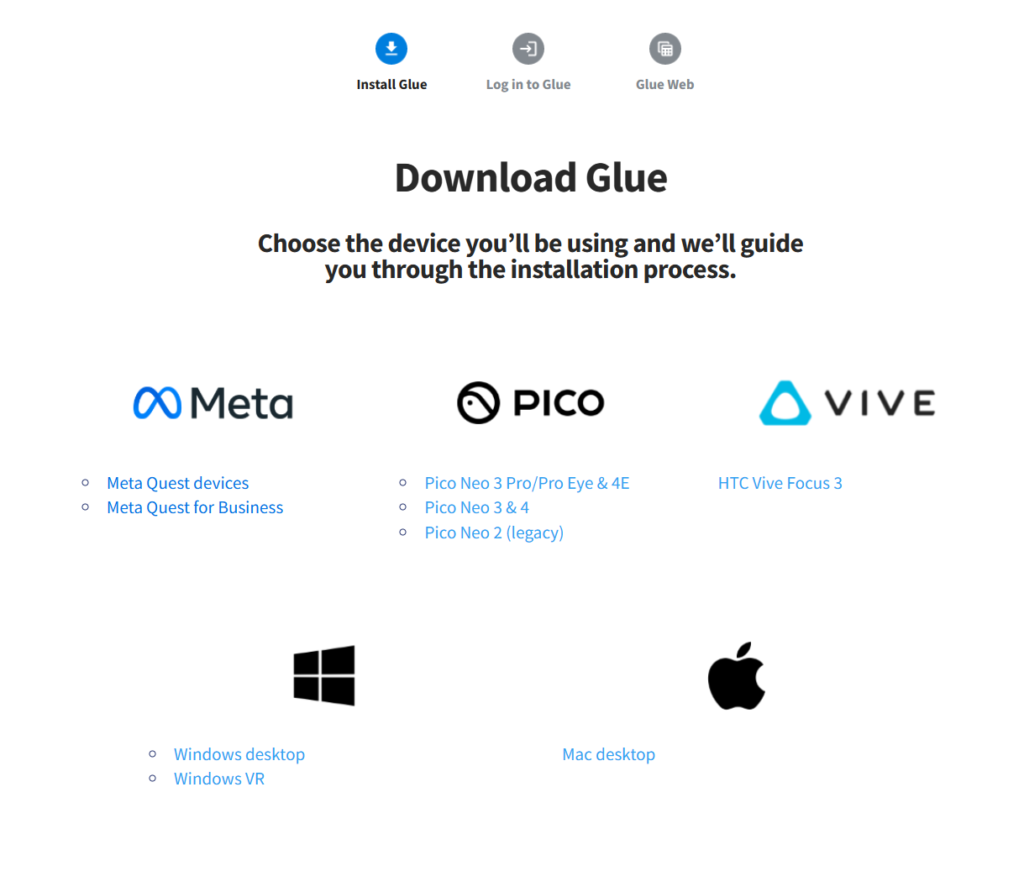
- Desktop: Native Glue client for Windows and macOS
- VR: Windows VR workstations (PC VR) and standalone Oculus Quest / Quest 2
- Web: A web app for out-of-session work (e.g., managing team members, spaces, and files)
- HTC Vive / Vive Pro
- Oculus Rift / Rift S
- Valve Index
- Windows Mixed Reality headsets (e.g., Samsung Odyssey, HP Reverb) (via SteamVR)
- Oculus Quest / Quest 2 (standalone)
Desktop + VR on Windows: minimum requirements
- Processor: current generation i7 or i5
- GPU: NVIDIA 1070 / 1070Ti or better
- Memory: 16GB+
- SSD hard drive
- Network: 4G/LTE connection or better
- OS: Windows 10 version 1073 or later
Desktop on macOS: minimum requirements
- MacBook or MacBook Pro
- Network: 4G/LTE connection or better
- OS: macOS High Sierra 10.13 or later
VR setup reality (what creates friction)
- For most PC VR headsets, SteamVR must be installed on the Windows PC running the Glue native client. SteamVR is distributed via Steam, so a Steam account is required to download/install it.
- VR is not currently supported on macOS.
- Windows Mixed Reality works in Glue via SteamVR (direct WMR support is noted as being investigated).
- Quest / Quest 2: requires an Oculus account at the device level, but Glue has its own internal login and one device can be used for multiple Glue sign-ins with different email addresses.
“Guest join” experience for first-timers (no hype)
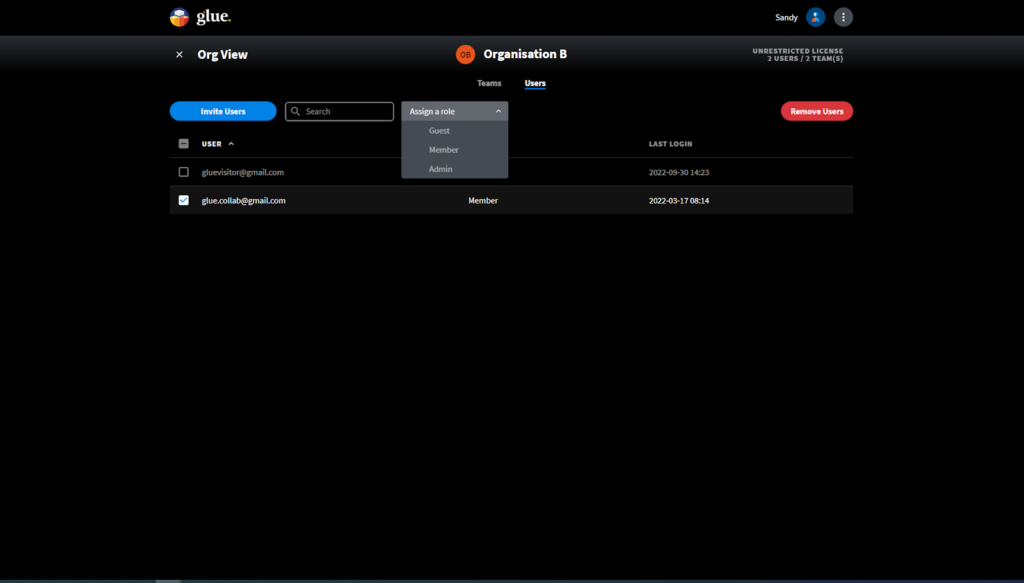
Glue is invite-only today: users must be authenticated and added as members of the relevant Glue Team to access that team’s spaces and files. Guest privileges are described as a future capability for restricted access scenarios.
3) Access and invitations: where Teams adds friction (especially for external people)
This is the part most teams discover late.
With Teams immersive events, attendance sits inside Teams rules. That can be totally acceptable for internal use. It becomes annoying when you want to invite external participants (partners, clients, guest speakers, cross-company groups).
What Microsoft’s own guidance makes clear:
- Joining as an external participant often means being added as a guest in the hosting organization, depending on how that organization is configured.
- Guest access is an org-wide setting in Teams and depends on configuration across Teams and Microsoft Entra ID (so “it works” is never just one toggle).
- Licensing-wise, organizers typically need specific licenses to host immersive events, while attendees generally need a base Teams license.
So the honest version is:
- Teams immersive events can be great for internal events, where everyone already lives in the same tenant and identity system.
- For external-facing sessions, the join experience often inherits guest identity and tenant policy complexity.
Glue’s posture is simply different: we design the experience around inviting and hosting people in immersive spaces, not around the assumption that everyone is already inside one M365 tenant.
More details about Glue Roles can be found here: https://knowledgebase.glue.work/post/user-roles
3a) IT and security considerations (what IT will ask in the first 5 minutes)
Glue is a standalone SaaS platform built around Teams, Team Spaces, and Team Files. Access to spaces and files is restricted to authenticated users who are members of the relevant Glue Team, and content is not accessible without an invite.
Identity & login
Glue uses Auth0 for authentication. Users can log in with Google accounts, and single sign-on can be enabled using an organization’s Active Directory credentials (with Glue’s help). If needed, users can also register with an email address via Auth0 verification.
Guest / external access
Glue Team membership controls visibility and access today. The overview notes that guest privileges are planned for cases where teams want to invite someone into a space with restricted access to private content.
Data residency & storage
Persistent data (user accounts, team files, and spaces) is stored within EU boundaries in line with GDPR, and service providers are described as ISO 27001 certified.
Security model (high level)
Glue states it does not store passwords in its databases, uses temporary access tokens, and restricts access to files/spaces to Team members. It also states there are no plaintext URLs pointing to private assets that can be guessed or randomly accessed.
Encryption & communication
Out-of-session traffic uses HTTPS. For real-time session traffic, files are transferred via HTTPS; VoIP and frequent real-time messages are protected using a Noise Protocol Framework cryptography implementation on a proprietary message format built on Google Protocol Buffers.
IT policy / firewall notes (practical)
Glue’s native application requires specific domains to be whitelisted for HTTPS traffic, and additional TCP/UDP traffic is used between the native client and session servers.
4) “Projects vs business”: the roadmap confidence question
In the Microsoft ecosystem, immersive is positioned as a Teams capability (and it has already been restructured once via retirement + replacement).
For Glue, immersive collaboration is the product and the business. If we’re not obsessed with making it work reliably, we don’t have anything else to hide behind.
That difference matters when you’re making investments (enablement, facilitators, internal champions, repeat sessions) that depend on stability.
5) Quick comparison table: similarities first, then practical differences
| What we used it for | Teams Immersive Events | Glue | Practical takeaway |
|---|---|---|---|
| Avatar presence + spatial vibe | Yes | Yes | Both can deliver presence. Pick based on how repeatable the program needs to be. |
| Internal events in a Teams-first org | Very aligned | Aligned | Teams wins when everything is already in-tenant and internal. |
| External sessions (partners/clients) | Can add guest/tenant friction | Typically smoother for cross-org hosting | If invites include “people outside our tenant,” friction becomes a feature, not a bug. |
| Long-term program, persistent spaces | Possible, but bounded by Teams product direction | Built for this | Glue fits “we do this every month” better than “we tried it once.” |
What we see in the real world (why pilots stall)
Immersive pilots usually don’t fail because the experience is bad. They fail because:
- the join flow is inconsistent across audiences (especially cross-org)
- ownership is unclear (“who maintains this space?”)
- the setup cost repeats every time
- the project loses priority and quietly stops getting attention
That’s why the deciding factor isn’t “which looks cooler.” It’s which can survive becoming operational.
Decision checklist
Glue is usually the better fit if we answer “yes” to any of these:
- We host sessions with external participants and want to minimize tenant/guest provisioning friction.
- We need persistent spaces people return to weekly/monthly, not one-off events.
- We’re building a program (onboarding, enablement, rehearsal, workshops), not a novelty session.
- We want immersive to be a core product priority, not a secondary feature inside a suite.
- We need clear ownership and reuse of spaces, layouts, and assets across sessions.
- We expect repeatable facilitation (templates, consistent flow), not rebuild-by-hand.
- We want predictable participation across devices and contexts.
- We need an IT story that’s straightforward to evaluate (identity, permissions, data handling).
6) When staying in Teams immersive is a perfectly sane choice
Stay in Teams immersive events if:
- The use case is internal-only, in one tenant, with stable IT policies.
- This is occasional (quarterly all-hands, lightweight onboarding moments).
- You’re happy with immersive being one capability among many in Teams.
Check out our blog post on how VR is used for coporate training: https://glue.work/vr-training
7) When Glue is the smarter move
Move to Glue if:
- We need persistent spaces that teams return to as part of normal work.
- We run sessions with external participants, and we don’t want guest-access bureaucracy to become the event’s main personality.
- We’re investing in a repeatable immersive program, and roadmap confidence matters (because training people for a “maybe-feature” is how pilots die).
8) A practical migration approach (no drama)
If we’re moving from “Teams immersive events” to Glue, the migration is mostly a use-case and format migration, not a data-export story:
- List the top 3 things we used immersive for (all-hands, onboarding, workshops, etc.).
- For each, define what must remain consistent (agenda flow, facilitation style, breakout structure, who attends).
- Rebuild those formats in Glue as repeatable rooms, so each session is an iteration, not a re-creation.
Before → After mapping examples (what actually changes)
Most teams aren’t migrating “data.” They’re migrating a repeatable format.
Example A: Onboarding session (internal)
Before (Teams immersive): schedule an immersive event for new hires, run the session, repeat next month.
After (Glue): create a persistent onboarding space with:
- a default room layout for the session
- reusable links/assets placed once (welcome content, agenda, resources)
- a repeatable facilitation flow for each cohort
Result: onboarding becomes a maintained asset, not a reassembled event.
Example B: Quarterly all-hands (mixed audience)
Before: immersive event inside Teams; external attendees may require guest setup depending on tenant policies.
After (Glue): a dedicated “All-hands” space used every quarter with:
- predictable room navigation
- consistent stage/meeting setup
- simplified invite flow appropriate for your audience
Result: less admin prep per event, more consistency for attendees.
Example C: Workshop series (program, not a one-off)
Before: recreate the environment each time (or accept variation).
After (Glue): one persistent workshop space with a “session template” approach:
- Room 1: plenary
- Rooms 2–X: breakout working rooms
- a consistent wrap-up flow
Result: the program scales because it’s repeatable.
CTA
If you’re weighing this and want a sanity check, pick a time for a 15-min chat https://warp.hyperspace.mv/widget/bookings/glue
We’ll go over what you used Mesh/Teams immersive for (meetings, onboarding, trainings, events), and we’ll map it to the closest Glue format and call out where the experience will feel the same versus where it improves.

